|
|
DSC Tech Library
911 Control > Start Emergency Broadcasting
Start Emergency Broadcasting
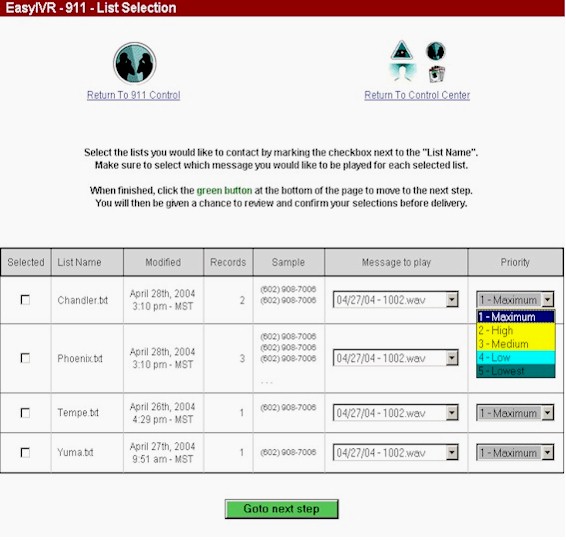
The first step to running an emergency broadcast is the selection of the phone list or lists. Each of the lists associated with a particular campaign is displayed and is selectable by the administrator.
Each list is named and has a corresponding create date displayed as well. Also the record count of numbers in this list is displayed along with a sample of the first few phone numbers that may be viewed by the administrator.
Next the appropriate WAV file must be selected for each of the lists that are to be broadcast. These are presented in a list box. Finally a priority may be placed on each list. This applies whenever multiple lists are selected to be broadcast and allows the administrator to prioritize one list over another.
When the proper phone list and WAV file has been selected, the administrator should push the Goto next step button.
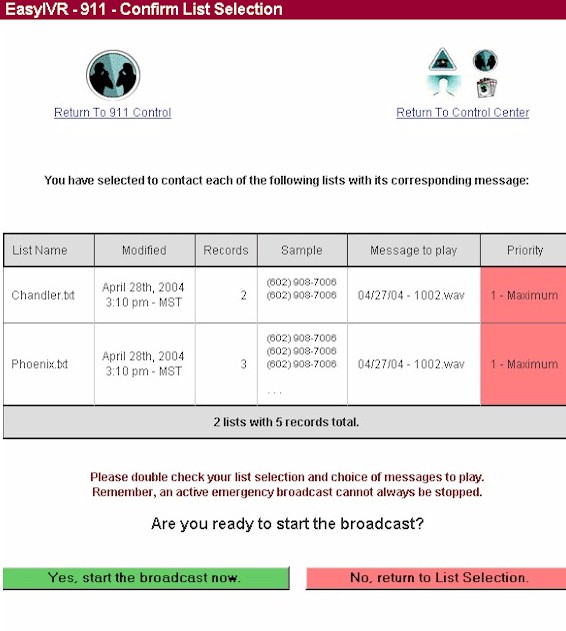
After the administrator has defined a voice broadcast campaign including the phone lists associated with the campaign as well as the emergency voice broadcasting message, it can be started by using this menu. Very simply, you can start a broadcast or cancel this request.
NOTE: When running a campaign over a network emergency broadcast system, if the campaign is spread over multiple dialers and associates, the start of this campaign may be staggered over multiple phone systems that are maintained in your local network or throughout a regional or national network.
The following options are available from this screen:
- Yes, start the broadcast now - This option initiatest the Emergency Voice Broadcast IMMEDIATELY
- No, return to List Selection - Cancel this request and return to the prior Menu
|