|
|
DSC Tech Library
 This section of our technical library presents information and documentation relating to Emergency Broadcasting Systems and Disaster Recovery Applications.
Should an emergency arise in your community, our 911 broadcast service can deliver large volumes of calls quickly using thousands of phone lines simultaneously. In the event of a blizzard, wild fire or devastating flood, your community can be notified quickly given specific instructions if an evacuation is required using our emergency broadcasting service. If a dangerous chemical spill occurs in your community, you can target specific areas to call. If a severe snow storm hits your area, your community can be notified of school closings or event cancellations.
This section of our technical library presents information and documentation relating to Emergency Broadcasting Systems and Disaster Recovery Applications.
Should an emergency arise in your community, our 911 broadcast service can deliver large volumes of calls quickly using thousands of phone lines simultaneously. In the event of a blizzard, wild fire or devastating flood, your community can be notified quickly given specific instructions if an evacuation is required using our emergency broadcasting service. If a dangerous chemical spill occurs in your community, you can target specific areas to call. If a severe snow storm hits your area, your community can be notified of school closings or event cancellations.
911 Broadcast - Client User Guide
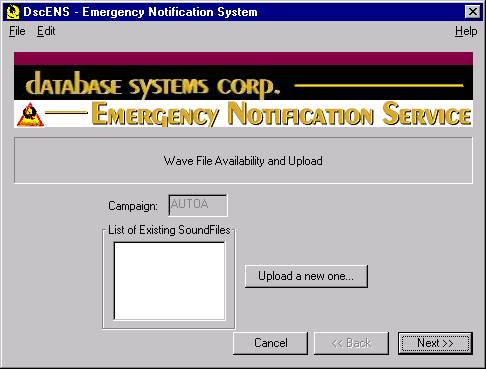
Wav File Selection / Upload
The administrator can download any number of message wav files for storage and subsequent playing in an emergency voice broadcast.
- Campaign - DISPLAY ONLY (from prior screen).
- List Of Existing SoundFiles - DISPLAY ONLY and Selection - this list represents all of the wav files that are maintained on the DscACS phone system. A Wav File may be selected from this existing list of messages.
- Upload a new one - If the administrator wishes to add a new Wav File to the list of messages on the left, simply depress this button and Browse the file system to copy an external file into the DscACS system. Once browsed and chosen, it will appear on the list to the left.
|